What is Flash?
In the simplest terms, Flash is a sales application used to sell products manufactured and sold by Cooper Lighting Solutions. The partners of CLS
can place orders for one or more products - otherwise known as Bill of Materials or BOM - and sell them to customers on behalf of CLS for a commission.
Essentially, Flash is the interface between CLS and their partners: on the CLS side, we have the Product and Pricing Analysts in charge of negotiations
and on the other side, we have the partners (aka agents.)
How It All Works
The below highlights how Flash is used by its end users:
- The distributor sends an RFQ to the agent.
- The agent enters the BOM into Flash
- If the materials and prices meet the CLS criteria, the order can be submitted to SAP
- If the product or prices deviate from the CLS criteria, agents can negotiate with the product and pricing analysts. Once an agreement is
reached, the order can be submitted
- In SAP, the order is processed; if the materials are Made to Order (MTO), they are manufactured in the plants on-demand. Once the items are
ready, they are shipped to the customers.
- For every order placed with CLS, the agent receives a commission.
How Flash Works
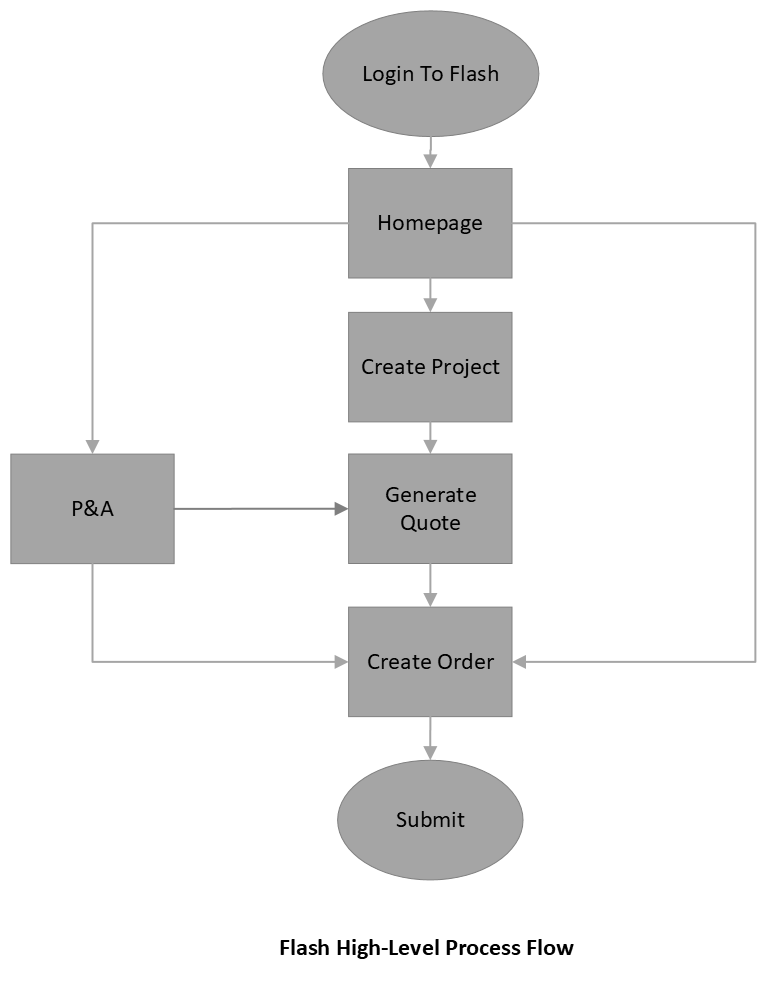
On a high level, Flash allows agents to create Projects, or Sales Opportunities, where they may enter the BOM
for one or more prospective customers. From the project, the agent may generate a quote specific to a customer, which in turn
may be converted into an order (on the customer's request) and submitted to SAP.
Key Points:
FlashPro is a user friendly client/server application designed to push / pull consolidated data from SAP for
both internal and external users. FlashPro consists of three Sales Instruments, commonly referred to as P/Q/O:
- Projects (P):Functions as a file folder where linked Quotes and Orders reside. Commonly known as an
Opportunity, or Sales Opportunity.
- Quotes (Q): Personalized quote for a specific BOM and customer including catalog logic, pricing and
commission.
- Orders (O): Allows users to convert Quotes to Orders, or create independent Orders and submit into SAP
for processing.