Change Configured Items
There are two ways to modify the catalog number of a product that has already been once.
- You can manually configure the item again. It's as simple as selecting the line item, going to the configurator, choosing your configurations and saving your selections.
- You can break a configuration.
Break A Configuration
Once configured, the catalog numbers of a product cannot be edited. If the catalog number needs to be changed, you will need to break the configuration. To do this:
Step 1: Under the line items tab in a P/Q/O.
Step 2: Select the check box of the line item for which you want to break configuration.

Step 3: Select the check box of the line item for which you want to break configuration.
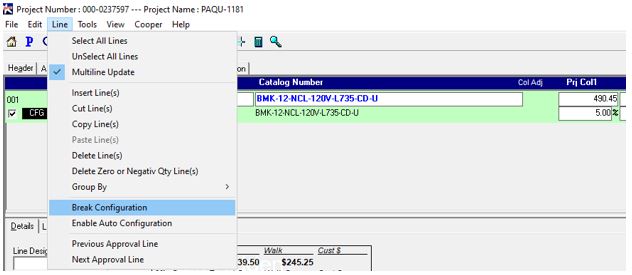
You will see that the configured line no longer has the 'CFG' label, but the product is still in blue.
Configured line before breaking configuration:

Configured line after breaking configuration:
